
StudioApp Pro5.0 - App Store
You'll be able to see results in few seconds.
Publisher Description
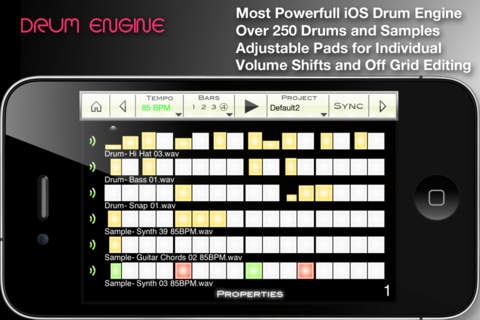
StudioApp Pro gives you the ability to create beats using a sample based production method.
StudioApp Pro includes a DIGITAL SAMPLER, seamless DRUM MACHINE, and RECORDING STUDIO!
250+ drums and samples plus intuitive and powerful interfaces make StudioApp Pro the perfect tool for mobile music production.
StudioApp Pro Features:
Recording Studio
4 Track Recording Interface + Instrumental
Sample Recording / Full Length Song Recording
Universal SoundBank
Sample Bouncing
Volume Mixers
Latency Detection/Compensation (within 1ms)
Audio Import/Export
Lyrics Notepad
Album Cover
Audio Bouncing for Infinite Recording Layers
Sequencer (Beat Machine)
250+ Drums and Samples
Universal SoundBank
Loop Bouncing + Live Automation Recording
16 to 64 Steps (4 Bars) Looping
Latency Detection/Compensation (within 1ms)
Adjustable Tempo (50-200 BPM)
Adjustable Pads for Independent Volume Levels
Adjustable Pads for Custom Time Signatures
Mono/Poly/Gate Settings
Volume mixers
Audio Bouncing for Infinite Track Layers
Wifi Import/Export
Digital Sampler
Dynamic Touch-Play Interface
Universal SoundBank
Audio Sampling/Truncation
Pitch-Shift
Automatic Cue Detection/Cue Movement
Wave Visualization
7 Zoom Modes
Granulation scratching
Realtime Recording of Automations
Metronome
Audio Store
150+ drums and samples
Sharing
Wifi exportation
Requires iOS 4.0 or later. Compatible with iPhone, iPad, and iPod touch.
About StudioApp Pro
The company that develops StudioApp Pro is Krasidy LLC. The latest version released by its developer is 5.0.
To install StudioApp Pro on your iOS device, just click the green Continue To App button above to start the installation process. The app is listed on our website since 2010-09-19 and was downloaded 0 times. We have already checked if the download link is safe, however for your own protection we recommend that you scan the downloaded app with your antivirus. Your antivirus may detect the StudioApp Pro as malware if the download link is broken.
How to install StudioApp Pro on your iOS device:
- Click on the Continue To App button on our website. This will redirect you to the App Store.
- Once the StudioApp Pro is shown in the iTunes listing of your iOS device, you can start its download and installation. Tap on the GET button to the right of the app to start downloading it.
- If you are not logged-in the iOS appstore app, you'll be prompted for your your Apple ID and/or password.
- After StudioApp Pro is downloaded, you'll see an INSTALL button to the right. Tap on it to start the actual installation of the iOS app.
- Once installation is finished you can tap on the OPEN button to start it. Its icon will also be added to your device home screen.
Program Details
System requirements
Download information
Pricing
Version History
version 5.0
posted on 2010-09-19
Disclaimer
Official App Store Link
We do not host StudioApp Pro on our servers. We did not scan it for viruses, adware, spyware or other type of malware. This app is hosted by Apple and passed their terms and conditions to be listed there. We recommend caution when installing it.
The App Store link for StudioApp Pro is provided to you by apps112.com without any warranties, representations or guarantees of any kind, so access it at your own risk.
If you have questions regarding this particular app contact the publisher directly. For questions about the functionalities of apps112.com contact us.
